Which ChatGPT Plans Show Ads? Free, Go, and Ad-Free Options
ChatGPT’s ads experience can be different for each plan and account. The feature is also being introduced gradually, so not everyone will see the same ads or settings.
What a user sees can depend on their plan and whether the advertising features are available to their account.
ChatGPT Plans and Their Current Ad Experience
According to OpenAI’s current guidance, ChatGPT Ads may appear on Free and Go plans, while Plus, Pro, Business, Enterprise, and Edu accounts will not have ads.
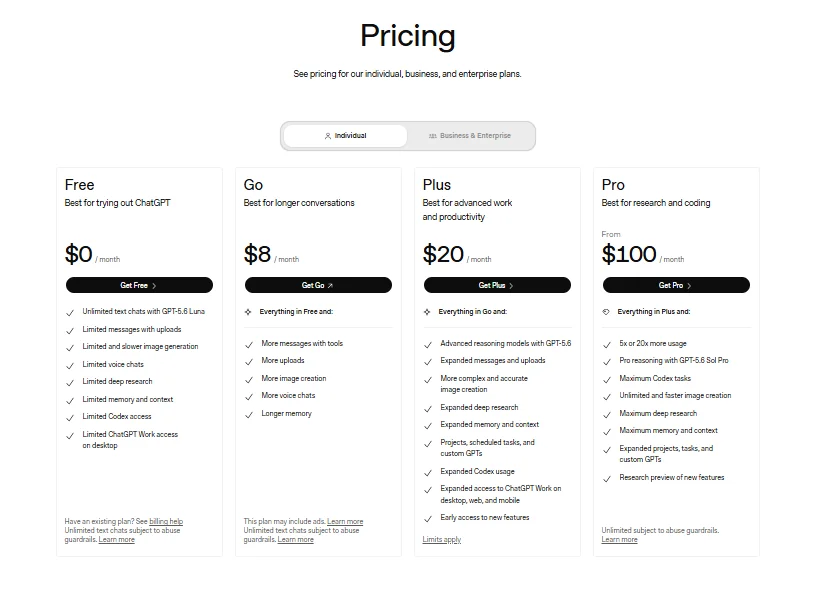
The phrase “may appear” is important. It does not mean every Free or Go user will see an advertisement every time they use ChatGPT.
For example, an eligible user might encounter an ad in one conversation but not another. The actual experience can depend on eligibility and the current rollout.
Why Can Go Show Ads Even Though It Is Paid?
ChatGPT Go is a paid subscription that provides expanded access to several ChatGPT features.
Go offers expanded access to popular features compared with Free, including more access to chat, image generation, file uploads, and advanced data analysis.
OpenAI’s current ads documentation says ads may appear on Go as well as Free.
For example, someone might choose Go because they want more access than the Free plan provides. That choice does not necessarily mean they are choosing an ad-free experience.
An Ad-Free Option
Some eligible Free users may have access to an option that removes advertisements. The option may come with lower usage limits and reduced access to some features.
Availability can vary by account. If you do not see an ad-free choice in Settings, it may simply not be available for your account yet.
Where to Find the Ad-Free Option
If the option is available, you can find it under Settings → Ads controls → Change plan to go ad-free.
Choosing this option lets you use ChatGPT without ads, while usage limits may be lower and access to some features may be reduced.
What Users Can Control and Ad Personalization
Depending on account eligibility, users may have advertising controls in Settings → Ads controls.
These controls can include:
- Turning ad personalization on or off
- Dismissing an ad
- Checking why an ad was shown
- Providing feedback about an ad
- Clearing data used for ads
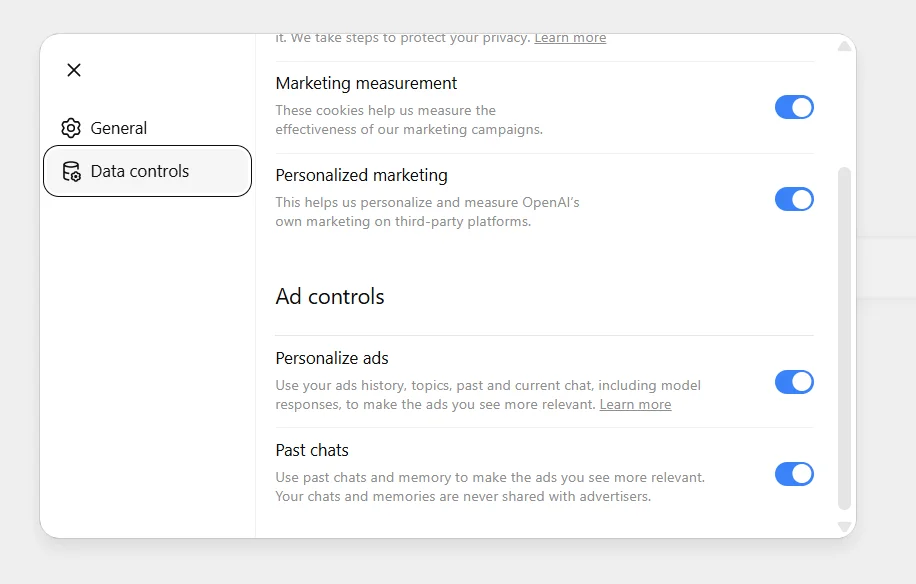
Turning off ad personalization does not necessarily remove ads. Instead, it can change which information is used to make advertising more relevant.
| Setting | Effect |
|---|---|
| Personalization enabled | Ads may use additional eligible signals |
| Personalization disabled | Ads may be less personalized |
| Ad-Free option | Ads are removed under this experience, with lower Free-plan limits |
For example, when personalization is turned off, OpenAI says ads can still use the context of the current chat thread, while other chat threads, ad history, and topics are not used to inform the ads shown.
Which Plan Is Best If You Do Not Want Ads?
The best option depends mainly on how much access you need and whether an ad-free choice is available to you.
| Option | Best For | Main Consideration |
|---|---|---|
| Ad-Free Free | Users who want to avoid ads and can accept lower limits | Reduced usage and feature access |
| Go | Users who want more access than Free | Ads may appear |
| Plus | Users who want a paid ad-free plan | Paid subscription |
| Pro | Users with higher usage needs | Higher subscription cost |
For example, a light user may find the Free ad-free experience sufficient if it is available. Someone who wants higher usage without the redu